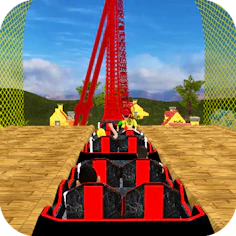
Roller Coaster Simulator
Game Racing
Steer a coaster along twisting 3D tracks and keep your passengers safe and balanced.
- Genre
- Game Racing
- Rating
- 3.9
- Plays on
- Mobile + Desktop
- Access
- Free Play
- Controls
- Touch + Keyboard
- Built with
- HTML5 Game
A short ad may play before this opens.
Details
Overview
Roller Coaster Simulator puts you in charge of a coaster on winding 3D tracks rendered with polished visuals. The controls are simple to pick up, and the loops, drops and turns keep things engaging over long sessions. Your job is to steer safely to the finish while keeping your passengers secure. Sharp turns and loops will rock the carriage, so you'll need to hold your balance as the route passes over dark waters and towering peaks — steadiness matters throughout the ride.
Gameplay and Experience
On a computer, accelerate with the Right Arrow key and slow down with the Left Arrow key; on a phone or tablet, control speed through the on-screen slider. Keeping the coaster balanced is essential for passenger safety. You advance by clearing levels, which opens up tougher tracks. A useful tip is to look ahead for upcoming bends so your ride stays smooth and the coaster thrill keeps flowing.
Controls
Desktop players accelerate with the Right Arrow key and brake with the Left Arrow key, while mobile players use the on-screen slider for throttle control. Balance remains crucial to keeping passengers safe. Clearing levels unlocks harder courses, and anticipating the track's twists ahead of time helps maintain a smooth, exciting run.
How to Play
Use the Right Arrow key to speed up and the Left Arrow key to slow down on desktop, or the on-screen slider on mobile. Passenger safety depends on keeping your balance through the twists. Completing levels unlocks new, more difficult courses, and reading the track ahead helps you keep the ride steady and thrilling.
Features
This is the official GamePix HTML5 embed, built with a responsive layout for mobile, tablet and desktop. It supports both touch and keyboard/mouse controls, plus landscape orientation.
Why You Should Play
A well-regarded entry in GamePix's official quality and popularity rankings, this responsive HTML5 game works with either touch or desktop controls.
Who Is This Game For?
Roller Coaster Simulator suits fans of racing and strategy-style racing games who want to play across mobile, tablet or desktop.
Can Roller Coaster Simulator be played on mobile?
Yes — the official HTML5 build supports responsive browser play with touch controls.
Does Roller Coaster Simulator require a download?
No download is needed; the game loads straight into the browser player once you hit Play Now.
Who hosts Roller Coaster Simulator?
The game is hosted and delivered through GamePix's embed.
Can the hosted game show ads?
The hosting provider may display ads within the embedded game experience.
Worth checking first
- Free to play instantly in the browser, no install needed
- Works on mobile, tablet and desktop with touch or keyboard controls
- Balance your coaster through loops and turns to keep passengers safe
- Progress by clearing levels to unlock tougher tracks
- Rated 3.9 out of 5 as a GamePix HTML5 title
Where it actually lives
Roller Coaster Simulator runs directly in the browser on this page — just press Play Now to start. There's nothing to install and no account required. On desktop, use the Right and Left Arrow keys to accelerate and brake; on mobile, use the on-screen slider to control throttle.