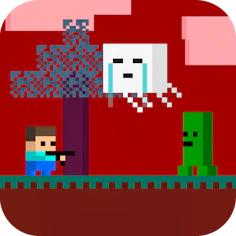
Steve AdventureCraft Nether
Game Shooting
Battle through 10 nether levels, fighting monsters and recruiting animal allies to win.
- Genre
- Game Shooting
- Rating
- 4.0
- Plays on
- Mobile + Desktop
- Access
- Free Play
- Controls
- Touch + Keyboard
- Built with
- HTML5 Game
A short ad may play before this opens.
Details
Overview
The nether portion of the AdventurCraft series packs in ten separate levels crawling with airborne screechers, zombies and other hostile creatures. Animals you come across are on your side, so gather them up, while every monster is fair game for hunting. Push through each level to claim victory. Controls are WASD plus F on a keyboard, or simple taps on mobile.
Gameplay and Experience
Move around with WASD and use F to act, or just tap if you're on a mobile screen. The goal is to take down hostile creatures while gathering animal allies as you go. A useful tip: the more animals you collect, the stronger you become.
Controls
WASD handles movement, F handles actions, and mobile players can rely on touch alone. Defeating monsters and picking up friendly animals both help you advance — collecting more animals boosts your strength.
How to Play
Same setup throughout: WASD to move, F to act, or tap on mobile. Take out the monsters, befriend the animals, and stack up as many allies as you can for extra power.
Features
Runs as an official GamePix HTML5 embed with a layout that adjusts across mobile, tablet and desktop. Supports both touch and keyboard/mouse input, with landscape orientation available.
Why You Should Play
A responsive HTML5 game that sits high in GamePix's official rankings for quality and popularity, playable via touch or standard desktop controls.
Who Is This Game For?
Fans of shooting, arcade and pixel-style games looking for something playable across mobile, tablet or desktop will find this a good fit.
Can Steve AdventureCraft Nether be played on mobile?
Yes — the official HTML5 build is responsive and supports touch controls in the browser.
Does Steve AdventureCraft Nether require a download?
No download is needed; it launches straight in the browser once you hit Play Now.
Who hosts Steve AdventureCraft Nether?
GamePix hosts and delivers this embedded game.
Can the hosted game show ads?
The hosting provider may include ads as part of the embedded game experience.
Worth checking first
- 10 levels set in the nether, packed with monsters and creatures
- Collect friendly animals for strength, hunt monsters to progress
- WASD + F on keyboard, or touch controls on mobile
- Responsive HTML5 game hosted via GamePix, playable on any device
- Rated 4 out of 5 in the Shooting category
Where it actually lives
Steve AdventureCraft Nether runs directly in the browser on this page — just press Play Now to start. No installation or account is required, and it works with either touch controls or a keyboard.